
AI features explained
UserSearch includes an AI-driven workspace called the AI Agent, branded S.A.R.G.E. (Strategic Autonomous Research Gathering Engine). It lets you drive OSINT searches conversationally rather than card-by-card, and it exposes a full-page entity search builder. Its in-chat persona introduces itself as “Sarge, your senior investigator.”
The AI Agent is a real, documented product feature (per Lee, 2026-07-08), though it carries a v0.3 (experimental) label in the interface. Treat its output accordingly — see Accuracy and responsible use.
The feature spans four surfaces:
| Surface | What it is |
|---|---|
| Entity-tab search builder | Full-page Module multi-select, Case attach, and run |
| AI Investigation Agent chat landing | Composer, model selector, quick-start buttons |
| ”Before You Use S.A.R.G.E.” consent modal | First-run privacy / responsible-use gate |
| Active S.A.R.G.E. chat | A live conversation thread |
The AI Agent chat
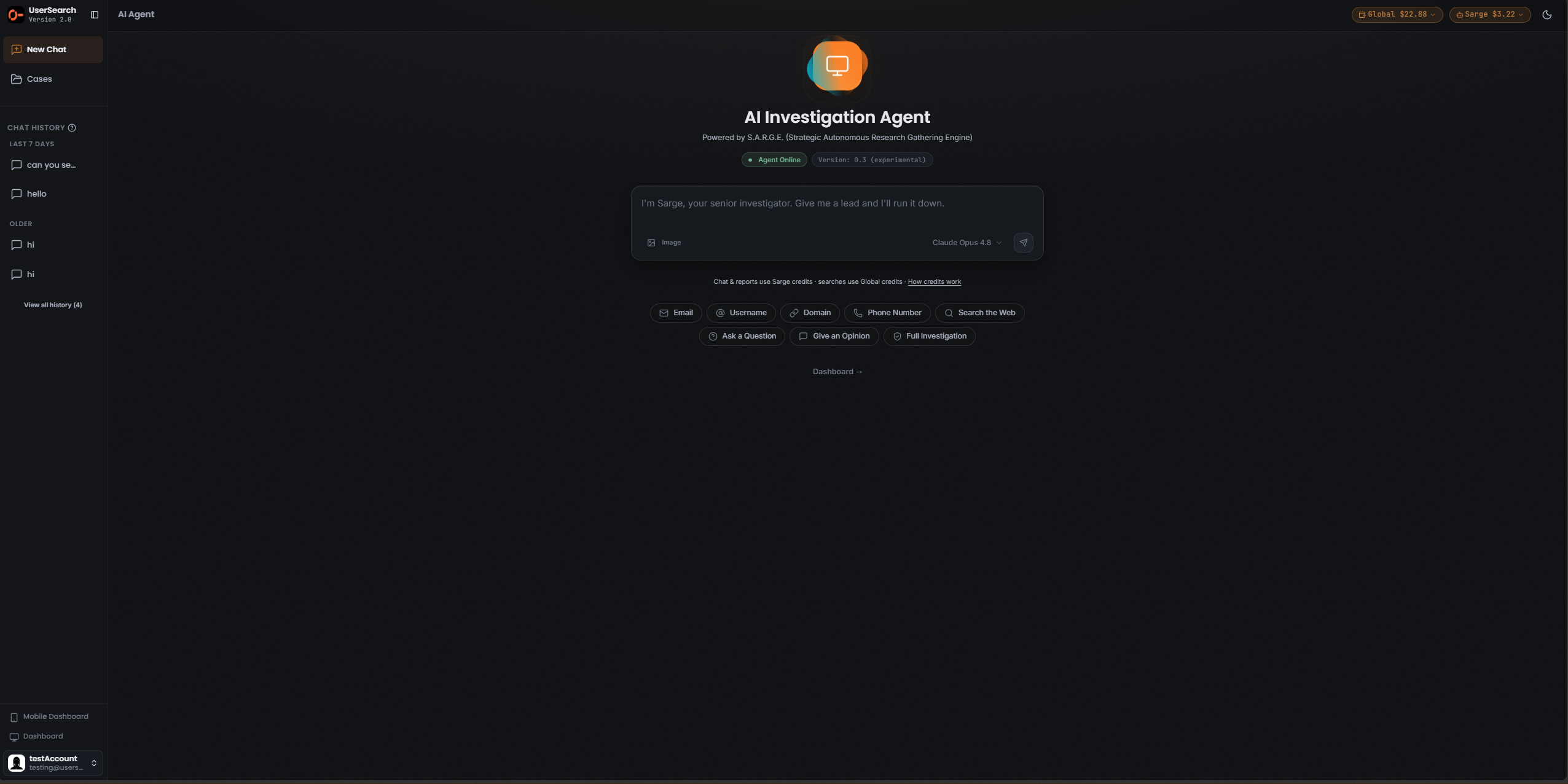
Section titled “The AI Agent chat”The chat entry point presents S.A.R.G.E. as an AI Investigation Agent, subtitled Powered by S.A.R.G.E. (Strategic Autonomous Research Gathering Engine). Two status pills sit side by side: a green Agent Online pill and a Version: 0.3 (experimental) pill.
The composer
Section titled “The composer”The message composer carries the placeholder “I’m Sarge, your senior investigator. Give me a lead and I’ll run it down.” and these controls:
- An Image attachment control (bottom-left).
- A model selector (bottom-right) reading Claude Opus 4.8 with a chevron.
- A send (paper-plane) button at the far right.
Quick-start buttons
Section titled “Quick-start buttons”Two rows of one-click starters help you begin a search. The exact state each button produces has not been captured, so treat these as launchers rather than documented workflows:
- Entity starters: Email, Username, Domain, Phone Number, Search the Web.
- Action starters: Ask a Question, Give an Opinion, Full Search.
A Dashboard → link sits below the starters.
Chat history
Section titled “Chat history”The left sidebar contains a CHAT HISTORY section, grouped into TODAY, LAST 7 DAYS, and OLDER, with a View all history count and a New Chat control. When empty, the body reads “No chat history yet.”
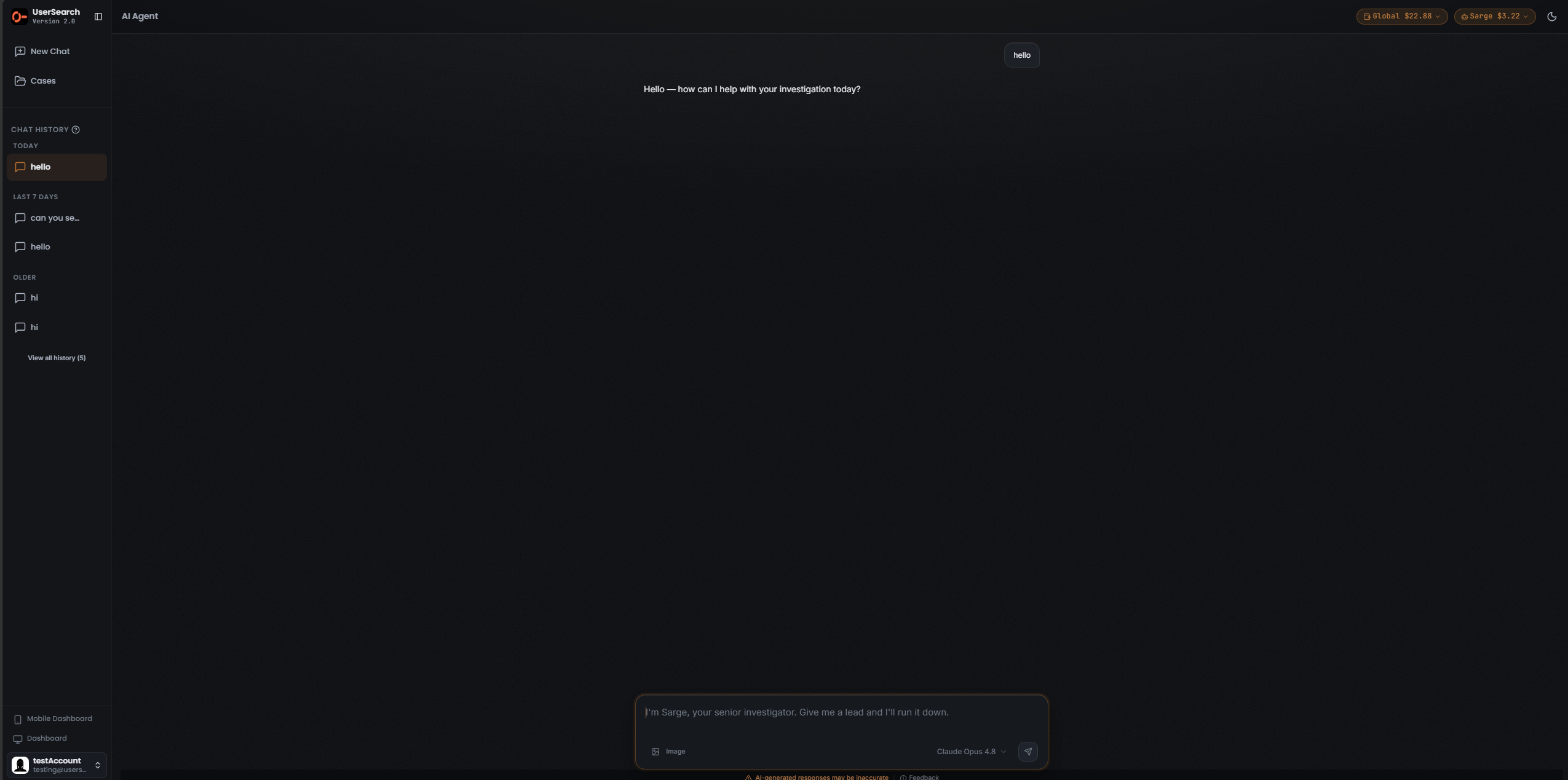
An active thread renders as a conventional chat: a right-aligned user bubble and S.A.R.G.E.’s reply. Below the composer is a persistent caution line, “AI-generated responses may be inaccurate,” and a Feedback link.
The entity search builder
Section titled “The entity search builder”The AI Agent also exposes a full-page search builder, letting you compose a structured search before (or instead of) chatting.
Choosing an entity and Search type
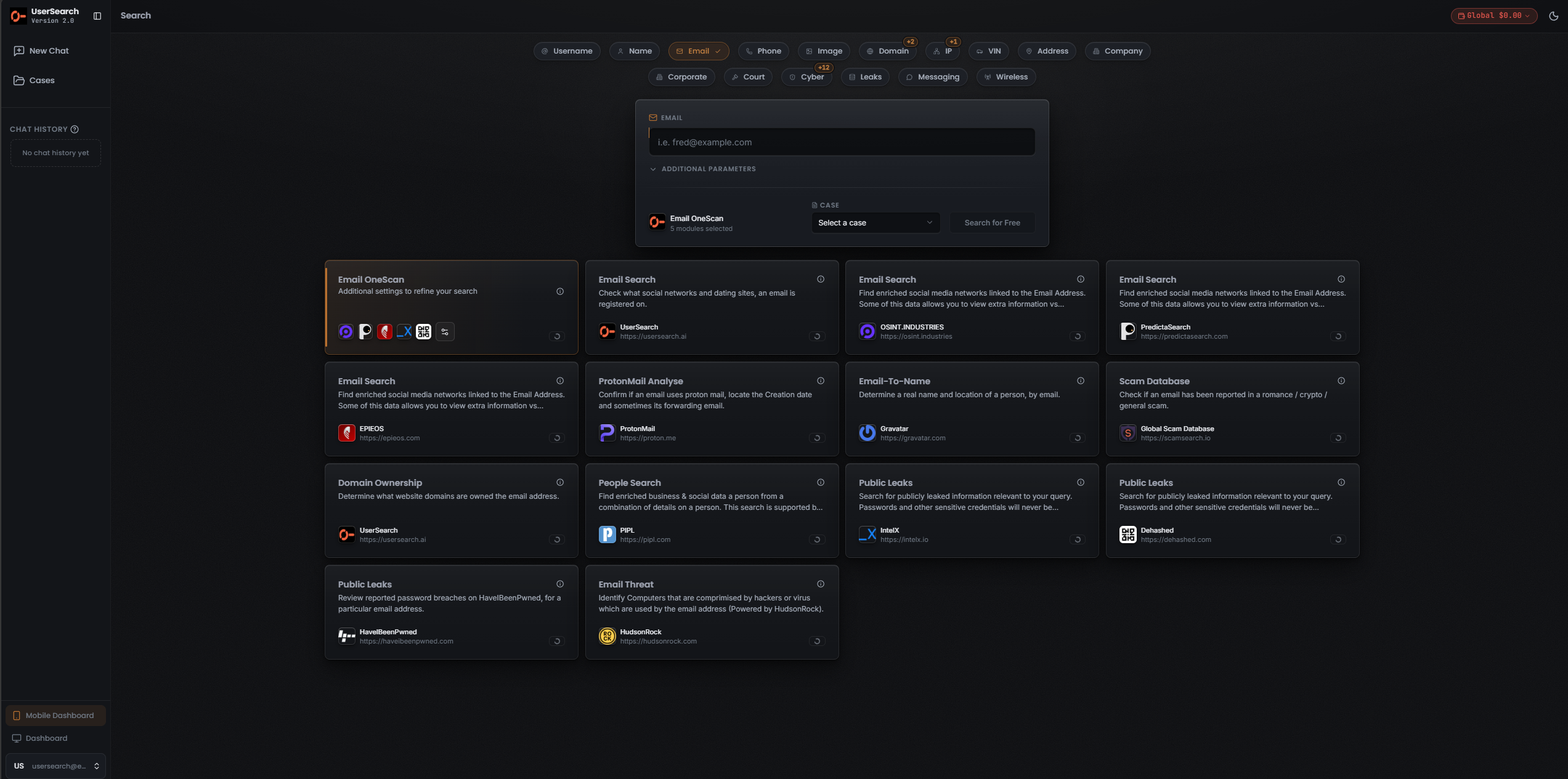
Section titled “Choosing an entity and Search type”- Row 1 — Entity type: Username, Name, Email, Phone, Image, Domain, IP, VIN, Address, Company. The active Entity is highlighted in the coral accent with a check-mark.
- Row 2 — Search type: Corporate, Court, Cyber, Leaks, Messaging, Wireless.
Some tabs carry a numeric “+N” badge (for example Domain shows “+2”, IP shows “+1”, and the Cyber Search type shows “+12”). These badges appear to indicate additional entries grouped under that tab (inferred from UI convention — not confirmed).
The builder card
Section titled “The builder card”With an Entity active, the builder card contains:
- A header naming the Entity (for example EMAIL) with an icon.
- A query input (for the Email Entity, placeholder “i.e. fred@example.com”).
- A collapsible ADDITIONAL PARAMETERS disclosure for further refinement.
- A OneScan summary line, for example “5 modules selected.”
- A CASE field with a Select a case dropdown, to attach the search to an existing Case.
- A Search for Free button beside the Case selector.
The Module grid
Section titled “The Module grid”The builder shows the same Module catalogue you would see in the normal Search type. For the Email Entity, the Email OneScan tile is the recommended multi-source Module — it fans out across several data sources and merges the results. Each Module tile carries an info (i) icon and a small status icon; opening a tile’s (i) shows details about that Module and data source (panel not captured).
The Email Modules and their data sources, as read from the tiles:
| Module | data source | What it does |
|---|---|---|
| Email Search | UserSearch | Check what social networks and dating sites an email is registered on. |
| Email Search | OSINT.INDUSTRIES | Find enriched social media networks linked to the email address. |
| Email Search | PredictaSearch | Find enriched social media networks linked to the email address. |
| Email Search | EPIEOS | Find enriched social media networks linked to the email address. |
| ProtonMail Analyse | ProtonMail | Confirm if an email uses ProtonMail; locate the creation date and sometimes a forwarding email. |
| Email-To-Name | Gravatar | Determine a real name and location of a person by email. |
| Scam Database | Global Scam Database | Check if an email has been reported in a romance / crypto / general scam. |
| Domain Ownership | UserSearch | Determine what website domains are owned by the email address. |
| People Search | PIPL | Find enriched business and social data for a person from a combination of details. |
| Public Leaks | IntelX | Search for publicly leaked information relevant to your query. |
| Public Leaks | Dehashed | Search for publicly leaked information relevant to your query. |
| Public Leaks | HavelBeenPwned | Review reported password breaches for a particular email address. |
| Email Threat | HudsonRock | Identify computers compromised by hackers or a virus that are used by the email address. |
First-run consent
Section titled “First-run consent”Before you can use S.A.R.G.E., a first-run modal titled Before You Use S.A.R.G.E. (sub-label PRIVACY, DATA & RESPONSIBLE USE NOTICE) gates access.
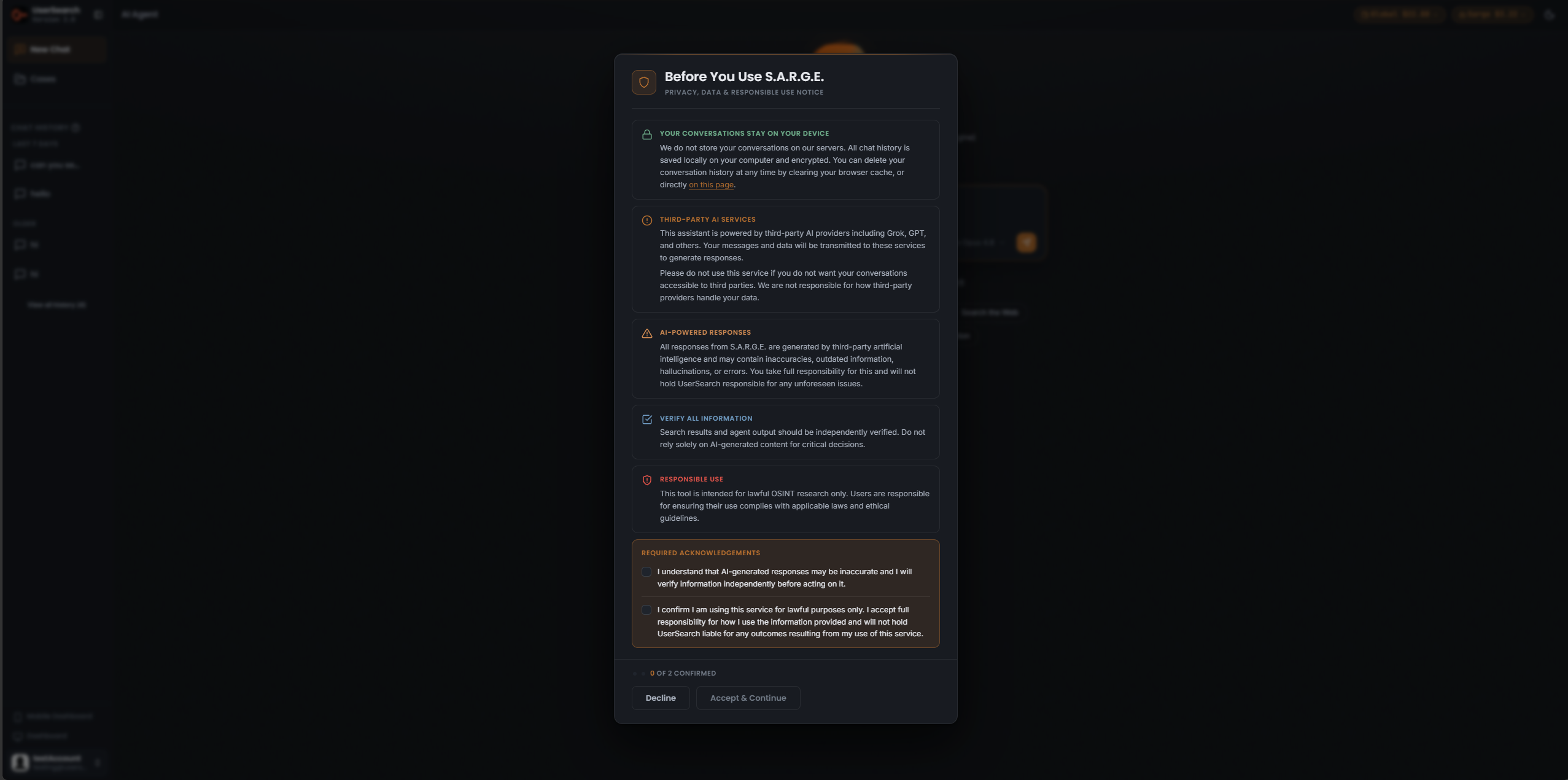
It presents five notices:
- YOUR CONVERSATIONS STAY ON YOUR DEVICE — conversations are not stored on UserSearch servers; chat history is saved locally on your computer and encrypted. You can delete it by clearing your browser cache, or directly on this page.
- THIRD-PARTY AI SERVICES — the assistant is powered by third-party AI data sources (“Grok, GPT, and others”); your messages and data are transmitted to those services to generate responses.
- AI-POWERED RESPONSES — responses are generated by third-party AI and may contain inaccuracies, outdated information, hallucinations, or errors; you take full responsibility.
- VERIFY ALL INFORMATION — results and agent output should be independently verified; do not rely solely on AI-generated content for critical decisions.
- RESPONSIBLE USE — the tool is intended for lawful OSINT research only.
Access requires two acknowledgements in a REQUIRED ACKNOWLEDGEMENTS panel:
- “I understand that AI-generated responses may be inaccurate and I will verify information independently before acting on it.”
- “I confirm I am using this service for lawful purposes only. I accept full responsibility for how I use the information provided and will not hold UserSearch liable for any outcomes resulting from my use of this service.”
A counter reads “0 OF 2 CONFIRMED” until both boxes are checked. The footer has Decline and Accept & Continue buttons.
Credits — the separate Sarge pool
Section titled “Credits — the separate Sarge pool”UserSearch maintains two separate credit wallets (per Lee, 2026-07-08): the main Global search-credits pool and the Sarge (AI Agent) pool. They are topped up and spent independently.
The AI Agent surfaces this split with two Credit pills at top-right (for example Global $22.88 and Sarge $3.22) and a note under the composer: “Chat & reports use Sarge credits · searches use Global credits,” followed by a How credits work link.
In short, within the AI Agent:
- Chat turns and generated reports draw from the Sarge pool.
- Underlying searches the agent runs draw from the Global pool.
Accuracy and responsible use
Section titled “Accuracy and responsible use”The AI Agent is labelled v0.3 (experimental), and both the product and this documentation treat its output as provisional:
- Every S.A.R.G.E. response can contain inaccuracies, outdated information, hallucinations, or errors — this is stated in the consent modal and repeated as a standing caution line beneath the composer.
- Independently verify anything the agent returns before acting on it, especially for critical decisions. This is one of the two acknowledgements you must confirm to use the feature.
- Use the tool for lawful OSINT research only; you are responsible for compliance with applicable laws and ethical guidelines.
Verified against UserSearch v2.0.20