
Website forensics modules & options
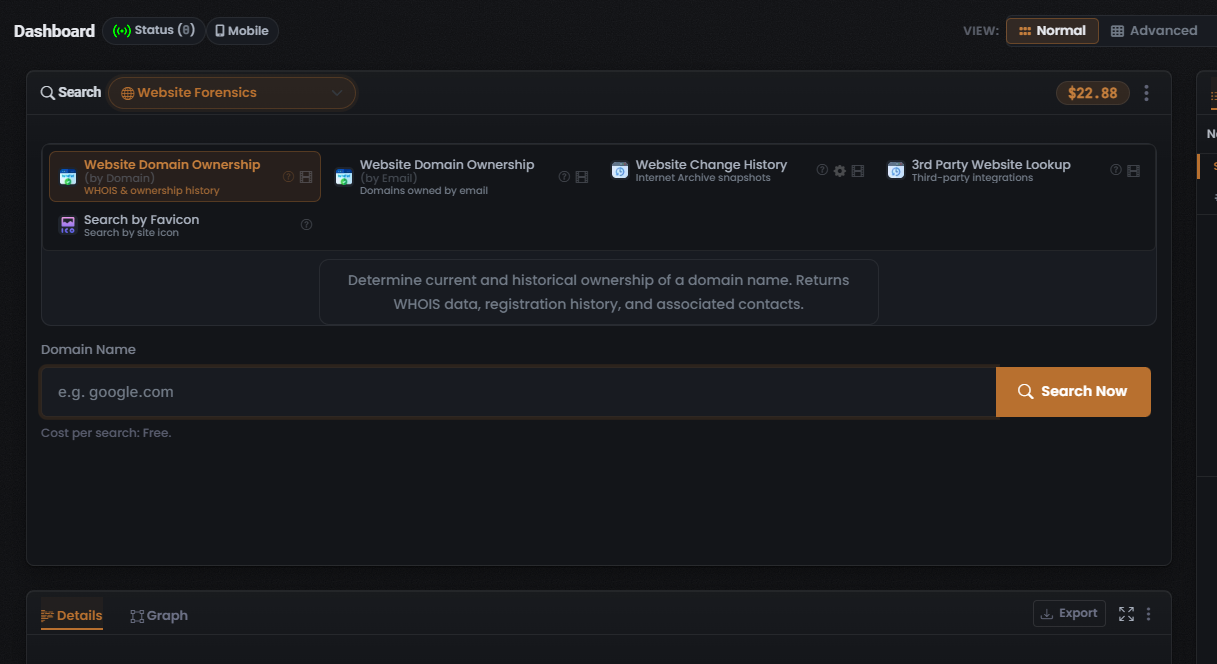
The Website Forensics search type exposes five Modules in the captured build, all single-purpose — this search type does not offer OneScan. For the composer flow that surrounds these Modules, see Website forensics search: overview.
The Modules
Section titled “The Modules”| Module | Data source | Input | Cost / cost type | What it returns |
|---|---|---|---|---|
| Website Domain Ownership (by Domain) (selected by default) | WHOIS (inferred) | Domain name | Free (0 Credits) | Current and historical domain ownership — WHOIS registration data, registration history, and associated contacts |
| Website Domain Ownership (by Email) | WHOIS reverse-lookup (inferred) | Email address (inferred) | Not captured — see caution | Reverse-WHOIS: the domains registered under a given email address |
| Website Change History | Internet Archive (inferred) | Domain name (inferred) | Not captured — see caution | Historical page snapshots via the Internet Archive (Wayback Machine); the tile carries a gear for per-Module settings |
| 3rd Party Website Lookup | Not captured | Domain name (inferred) | Not captured — see caution | Aggregates results from external third-party website-intelligence integrations |
| Search by Favicon | Not captured | Favicon / domain (inferred) | Not captured — see caution | Finds other sites sharing the same favicon (site-icon) hash |
Website Domain Ownership (by Domain)
Section titled “Website Domain Ownership (by Domain)”Website Domain Ownership (by Domain) is the lead Module and is pre-selected when you open the Website Forensics search type. Its tile is drawn with a coral-orange highlighted border.
- Returns: the domain’s current and historical ownership — WHOIS registration data, registration history, and associated contacts.
- Input: a Domain Name.
- Cost: the line beneath the input reads “Cost per search: Free” — the Module consumes no Credits per search (see Credits and pricing).
- Data source: WHOIS, inferred from the Module name and not confirmed on screen — see WHOIS.
Website Domain Ownership (by Email)
Section titled “Website Domain Ownership (by Email)”- Purpose: a reverse-WHOIS lookup — finds the domains registered under a given email address. A pivot from an email to the domains it owns.
- Input: an email address (inferred from the Module name; the field label was not captured).
- Cost: not captured.
- Data source: WHOIS run as a reverse-lookup, inferred from the Module name and not confirmed on screen — see WHOIS.
Website Change History
Section titled “Website Change History”- Purpose: returns historical page snapshots so you can compare how a site’s content changed over time.
- Input: a domain name (inferred).
- Cost: not captured.
- Data source: the Internet Archive (Wayback Machine), inferred from the Module name and not confirmed on screen — see Internet Archive (Wayback).
- Gear icon: this tile carries a gear — a per-Module settings affordance. The settings behind it were not captured.
3rd Party Website Lookup
Section titled “3rd Party Website Lookup”- Purpose: aggregates results from external third-party website-intelligence integrations.
- Input: a domain name (inferred).
- Cost: not captured.
- Data source: not captured.
Search by Favicon
Section titled “Search by Favicon”- Purpose: finds other sites that share the same favicon (site-icon) hash — a pivot from one site’s icon to others using the same icon.
- Input: a favicon or domain (inferred).
- Cost: not captured.
- Data source: not captured.
The data source behind each Module
Section titled “The data source behind each Module”OneScan and per-search options
Section titled “OneScan and per-search options”Per-Module settings
Section titled “Per-Module settings”The Website Change History tile exposes a gear icon — the app-wide affordance for a Module that carries its own per-Module settings.
See also: Website forensics search: overview and Reading Website forensics results.
Verified against UserSearch v2.0.20