
Cyber & hosts modules & options
The Cyber & hosts search type (Cyber Intelligence in the composer) exposes twelve Modules in the captured build. Each Module is a card in the grid that runs one lookup against the same data source — Shodan. Cyber & hosts runs entirely on Shodan, so your choice is which lookup, not which data source. Selection is single-select: the active tile carries a coral-orange border and title.
For the composer flow that surrounds these Modules, see Cyber & hosts search: overview; for reading what comes back, see Reading Cyber & hosts results. The data source behind every Module is Shodan.
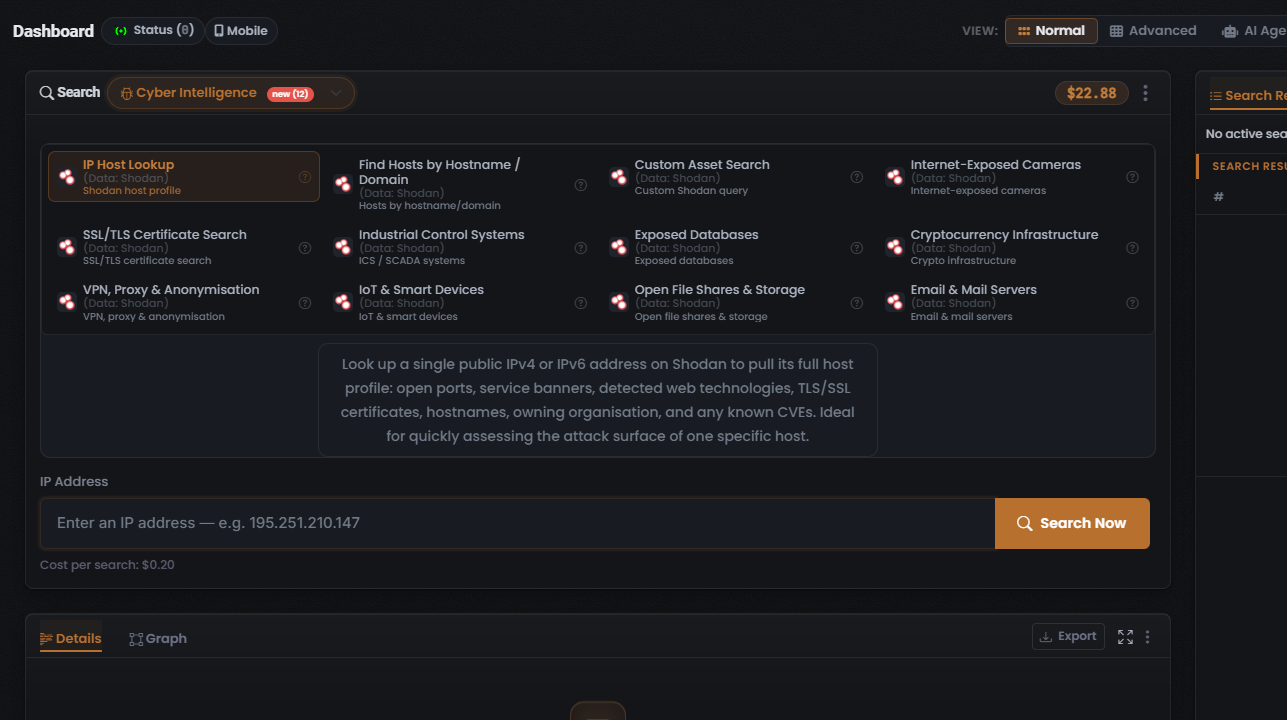
The twelve Modules
Section titled “The twelve Modules”Every Module below runs against Shodan — the column is omitted because it never varies. The choice between them is which lens you put on Shodan’s scan data: a single host, a whole domain, a certificate, a class of device, or a custom query.
| Module (as shown on the tile) | What it searches | Input | Cost |
|---|---|---|---|
| IP Host Lookup (selected by default) | Full host profile for a single address — open ports, banners, technologies, TLS certs, CVEs | IP address (IPv4/IPv6) | $0.20 (fixed) |
| Find Hosts by Hostname / Domain | Hosts matching a hostname or domain | Hostname / domain (observed 2026-07-10) | $0.20 (fixed, observed 2026-07-10) |
| Custom Asset Search | A custom Shodan query over exposed assets | Shodan query (inferred) | Not captured |
| Internet-Exposed Cameras | Internet-facing cameras | Shodan query (inferred) | Not captured |
| SSL/TLS Certificate Search | TLS/SSL certificate records | Certificate query (inferred) | Not captured |
| Industrial Control Systems | ICS / SCADA systems | Shodan query (inferred) | Not captured |
| Exposed Databases | Publicly exposed databases | Shodan query (inferred) | Not captured |
| Cryptocurrency Infrastructure | Crypto infrastructure hosts | Shodan query (inferred) | Not captured |
| VPN, Proxy & Anonymisation | VPN, proxy, and anonymisation infrastructure | Shodan query (inferred) | Not captured |
| IoT & Smart Devices | IoT and smart devices | Shodan query (inferred) | Not captured |
| Open File Shares & Storage | Open file shares and storage | Shodan query (inferred) | Not captured |
| Email & Mail Servers | Email and mail servers | Shodan query (inferred) | Not captured |
The lead Module: IP Host Lookup
Section titled “The lead Module: IP Host Lookup”IP Host Lookup is pre-selected when you open the search type. Use it to build a full Shodan profile for one address — its open ports, service banners, detected technologies, TLS certificates, and any associated CVEs.
- Input: a target IP address, IPv4 or IPv6.
- Cost: the line beneath the input reads $0.20 — a fixed per-search charge.
- Result: any matches are marked Found, and the results table’s Data Source column shows Shodan.
The other Modules — choosing a different lens
Section titled “The other Modules — choosing a different lens”Switch Modules when your starting identifier is not a single IP address. Each is the same Shodan search shaped for a different target:
- Find Hosts by Hostname / Domain — start from a hostname or domain rather than an address.
- Custom Asset Search — write your own Shodan query over exposed assets.
- SSL/TLS Certificate Search — search TLS/SSL certificate records.
- Class-of-device lookups — Internet-Exposed Cameras, Industrial Control Systems, Exposed Databases, Cryptocurrency Infrastructure, VPN, Proxy & Anonymisation, IoT & Smart Devices, Open File Shares & Storage, and Email & Mail Servers each scope the search to one class of exposed system.
Selecting a different Module changes the input field and may change the Cost per search. Because only the default Module’s cost and input are confirmed, check both on-screen each time you switch.
No OneScan, no data-source choice
Section titled “No OneScan, no data-source choice”Per-tile controls
Section titled “Per-tile controls”Each Module tile shows a data-source icon, a bold title, and a short descriptor, and tiles typically carry a circular ”?” help icon and, on some, a film-strip (tutorial/video) icon.
Related: Cyber & hosts search: overview · Reading Cyber & hosts results · Shodan · Data sources & reliability
Verified against UserSearch v2.0.20