
Email modules & options
The Email Intelligence search type exposes eleven Modules in the captured build. Each Module is a card in the grid that runs one search against a specific data source — the external third party that holds the data — or, for OneScan, across several data sources at once. Selection is single-select: the active tile carries a coral-orange border and title.
For the composer flow that surrounds these Modules, see Email search: overview; for reading what comes back, see Reading Email results.
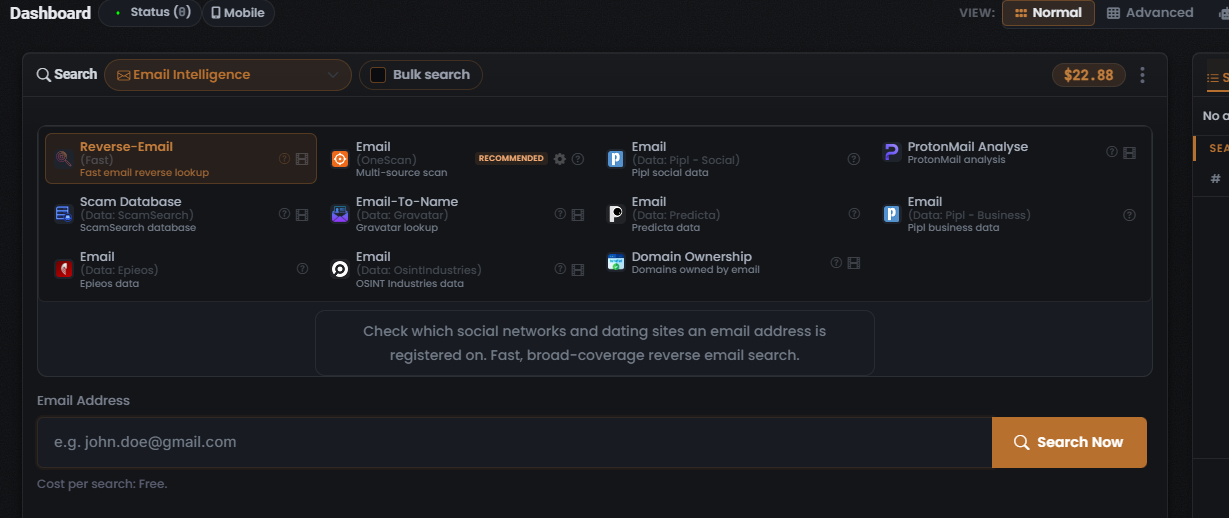
The eleven Modules
Section titled “The eleven Modules”| Module (as shown on the tile) | data source | What it returns | Cost | Integration |
|---|---|---|---|---|
| Reverse-Email (Fast) (selected/lead) | UserSearch (own fast reverse index) | Fast, broad reverse-email sweep over social and dating registrations, with profile enrichment | Free | — |
| Email (OneScan) · RECOMMENDED | Multiple (OneScan) | One email run across several data sources at once, merged for comparison | Dynamic — not captured | — |
| Email (Data: Pipl - Social) | Pipl (Social) | Email identity / social enrichment over Pipl social data | Not captured (fixed) | Pipl |
| Email (Data: Pipl - Business) | Pipl (Business) | Single-source email search over Pipl business data | Not captured (fixed) | Pipl |
| Email (Data: Predicta) | Predicta | Single-source email search over Predicta data | Not captured (fixed) | Predicta |
| Email (Data: Epieos) | Epieos | Account-existence / OSINT footprint for an email over Epieos data | Not captured (fixed) | Epieos |
| Email (Data: Osintindustries) | OSINT Industries | Account-existence / OSINT footprint for an email over OSINT Industries data | $0.70 (fixed, observed 2026-07-10) | OSINT Industries |
| Email-To-Name (Data: Gravatar) | Gravatar | Resolves an email to a public Gravatar profile name and avatar | Not captured | Gravatar |
| ProtonMail Analyse | ProtonMail | ProtonMail-specific analysis for an email address | Not captured | ProtonMail |
| Scam Database (Data: ScamSearch) | ScamSearch | Scam / fraud database matches for an email address | Not captured | — |
| Domain Ownership | Not captured | Domains owned by / registered under an email address | Not captured | — |
The lead Module: Reverse-Email (Fast)
Section titled “The lead Module: Reverse-Email (Fast)”Reverse-Email (Fast) is the lead Module and appears pre-selected when you open the search type. It runs a fast, broad-coverage reverse-email search over social and dating registrations, with profile enrichment of the results. Its Cost per search is Free.
The single-source Modules
Section titled “The single-source Modules”Nine Modules query one named data source directly. Pick these when you want a specific source rather than the fast sweep or the merged OneScan run:
- Pipl (Social) and Pipl (Business) — email lookups over Pipl’s social and business datasets. See Pipl.
- Predicta and OSINT Industries — single-source email searches over each vendor’s data. See Predicta and OSINT Industries.
- Epieos — account-existence and OSINT footprint for an address. See Epieos.
- Email-To-Name (Gravatar) — resolves the address to a public Gravatar profile name and avatar.
- ProtonMail Analyse — ProtonMail-specific analysis of the address. See ProtonMail.
- Scam Database (ScamSearch) — scam and fraud reports filed against the address.
- Domain Ownership — domains owned by or registered under the address.
OneScan — the multi-source Module
Section titled “OneScan — the multi-source Module”Email (OneScan) is badged RECOMMENDED. A single OneScan search fans one address out across several data sources simultaneously and merges the results, so the results table attributes each row to the data source that returned it.
OneScan’s cost is dynamic — the charge is the sum of the data sources left toggled on in its Choose Data Source modal. Reducing the enabled set lowers the cost; that is the lever you pull to trade coverage against spend. See OneScan explained.
Choose Data Source
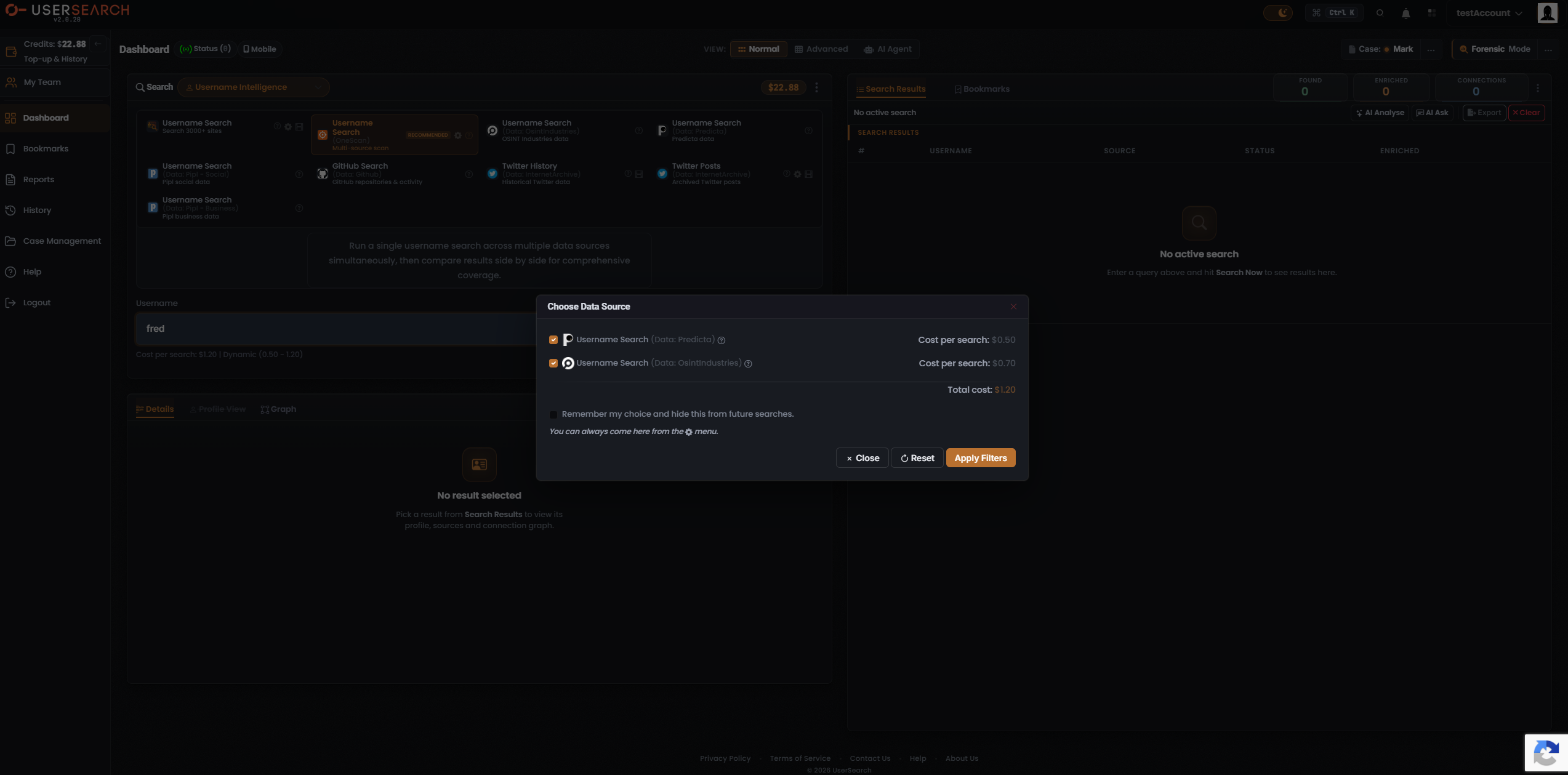
Section titled “Choose Data Source”The OneScan Module carries a gear icon that opens a Choose Data Source modal. For OneScan, the modal lists the individual data sources it can query, each with a checkbox and its own per-search cost:
- Each data source row has a checkbox and a Cost per search value.
- A Total cost line at the bottom sums the enabled data sources. Toggling a data source off removes its cost from the total and narrows which data sources OneScan queries.
- A “Remember my choice and hide this from future searches” checkbox persists the selection so the modal is skipped next time; its helper text notes you can always return via the gear menu.
- Commit with Apply Filters, restore defaults with Reset, or dismiss without committing via Close or the ×.
Per-tile affordances
Section titled “Per-tile affordances”Each Module tile shows a data-source icon, a bold title, a greyed data-source sub-label (shown as “(Data: …)”), and a short descriptor. Tiles also carry a circular ”?” help icon, and some carry a film-strip (tutorial/video) icon.
Related: Email search: overview · Reading Email results · OneScan · Data sources & reliability · Module catalogue
Verified against UserSearch v2.0.20