
Credits and pricing explained
UserSearch meters usage with Credits, a prepaid currency you top up in advance and spend as you search. This page explains what a Credit is, the three ways a search can be priced, why some prices appear as a range, and the two separate pools your Credits live in.
What a Credit is
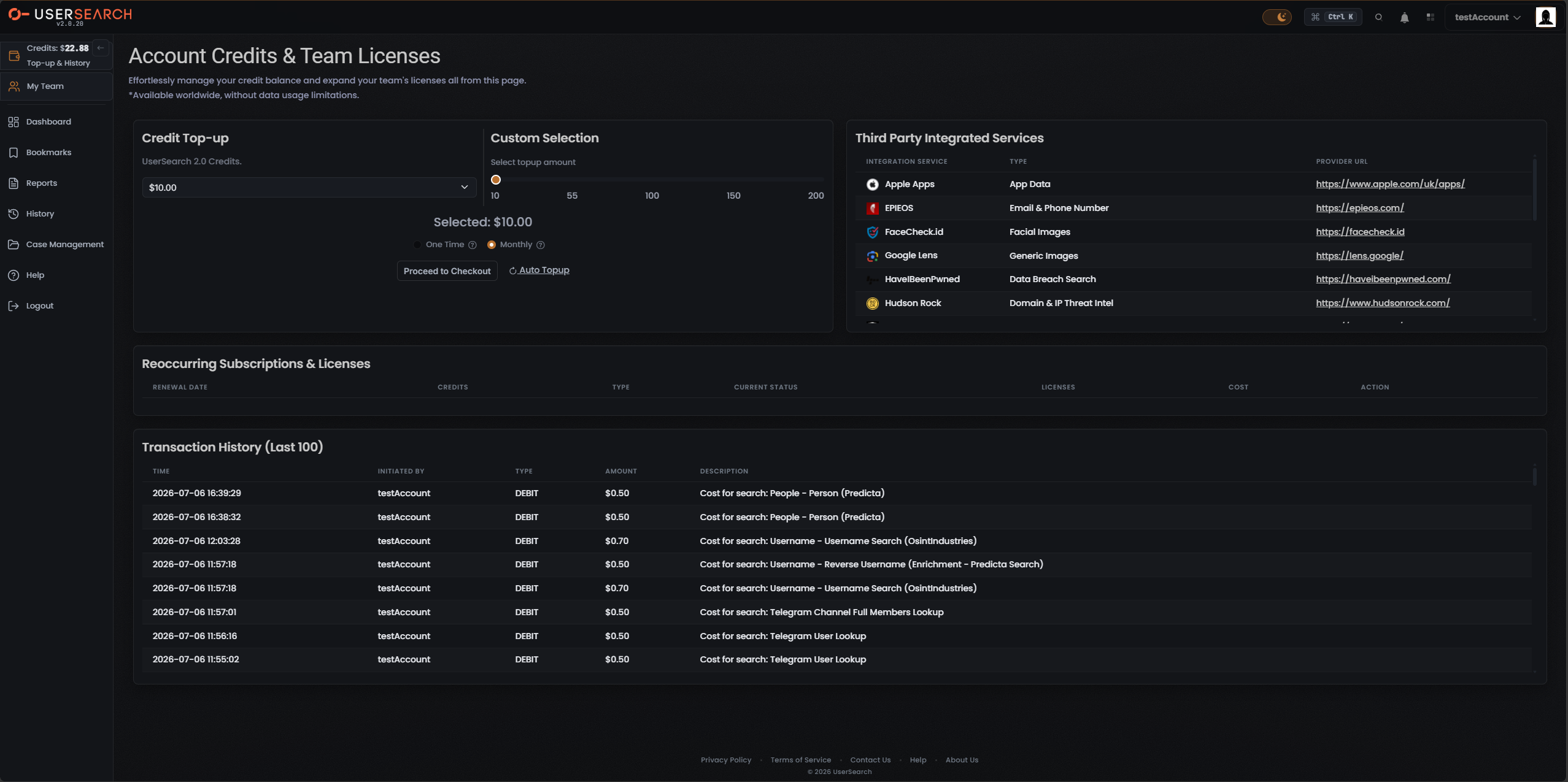
Section titled “What a Credit is”Credits are your prepaid usage currency: every search costs zero or more Credits, deducted from a running balance. Your current balance appears in the top bar as a wallet-style widget with the sub-label Top-up & History (for example, Credits: $22.88).
Credits are displayed with a currency symbol ($) rather than an abstract point count, and individual charges in your Transaction history are shown as dollar amounts (for example, $0.50 or $0.70).
The three pricing types
Section titled “The three pricing types”Every search falls into one of three cost types. Understanding which type applies tells you what to expect on your bill.
| Pricing type | What you pay | Example |
|---|---|---|
| Free | 0 Credits | — |
| Fixed | A set amount, the same every time | A Vehicle Search type/Module search |
| Dynamic | A variable amount, shown as a range | A OneScan search |
Some searches cost nothing and deduct 0 Credits from your balance.
A fixed-price search always costs the same set amount. Search type and Module searches such as Vehicle are priced this way, so the cost you see before running one is the cost you pay.
Dynamic
Section titled “Dynamic”A dynamic search costs a variable amount, which the interface shows as a range rather than a single number. The most common example is a OneScan search.
Why some prices are a range
Section titled “Why some prices are a range”A OneScan search queries multiple data sources at once, and its price is the sum of all data sources left selected in the Choose Data Source modal. Because you can toggle individual data sources on or off, the total moves up or down as you change your selection — so the price is displayed as a range (for example, $0.50–1.20) rather than a fixed figure.
In practice:
- Open the Choose Data Source modal for a OneScan search.
- Each selected data source adds its own cost to the total.
- Turning a data source off lowers the total; turning one on raises it.
- The displayed range reflects the current selection, so you control where in the range the final charge lands.
The two credit pools
Section titled “The two credit pools”Your Credits are not a single balance — they live in two independent pools, which are topped up and spent separately:
- The main Global pool — your ordinary search-credits balance. This is the figure shown in the top bar, and it is labelled UserSearch 2.0 Credits in the top-up panel. Running ordinary searches draws this pool down.
- The S.A.R.G.E. pool — a separate balance for the AI Agent feature. S.A.R.G.E. usage draws down its own pool, not the Global one.
Because the pools are independent, spending in one does not reduce the other: ordinary searches never touch your S.A.R.G.E. balance, and S.A.R.G.E. never touches your Global balance.
Topping up the Global pool
Section titled “Topping up the Global pool”You add Global Credits from the Account Credits & Team Licenses page, using two coordinated controls in the Credit Top-up area:
- A dropdown (labelled UserSearch 2.0 Credits) showing a preset amount such as $10.00.
- A Custom Selection slider with tick labels 10, 55, 100, 150, 200, plus a live Selected: readout of the chosen amount.
You then choose between two options before checkout:
- One Time — a single, one-off purchase.
- Monthly — a recurring top-up of the chosen amount.
Selecting Proceed to Checkout advances to payment. A separate Auto Topup control can top your balance up automatically when it runs low.
Where charges appear
Section titled “Where charges appear”Every search you run is logged as a DEBIT in Transaction history (labelled Transaction History (Last 100)), with the time, who initiated it, the type, the amount, and a description of the search. Each row confirms the exact amount deducted from your Global pool — for example, Cost for search: Username - Username Search (OsintIndustries) at $0.70.
Shared credits on team accounts
Section titled “Shared credits on team accounts”If you are on a team account rather than a single account, your team draws on one common pool of Credits, controlled by a team leader. Team members spend from the same shared Global balance (and can access the team’s shared Cases). Single accounts do not share: their Cases and Credits belong to the one user.
Verified against UserSearch v2.0.20